Polls and feedback
Ask customers what they prefer, collect feedback or gather choices such as T-shirt sizes. People answer from a link or QR code without an account, and you see the combined results.
On this page
All guides
Start a survey
- Choose Forms → Create a form, then one of Quick poll, Feedback, Collect choices or Blank survey. Feedback first asks what kind of business it is and starts with ready questions for it.

- Change the questions. Up to 8 choices show as large buttons on phones.
- Check your privacy notice: it uses your saved business details, and you say in a few words why you ask.
- In Review and publish, choose a closing date or none.
- Publish and share the link or QR code.
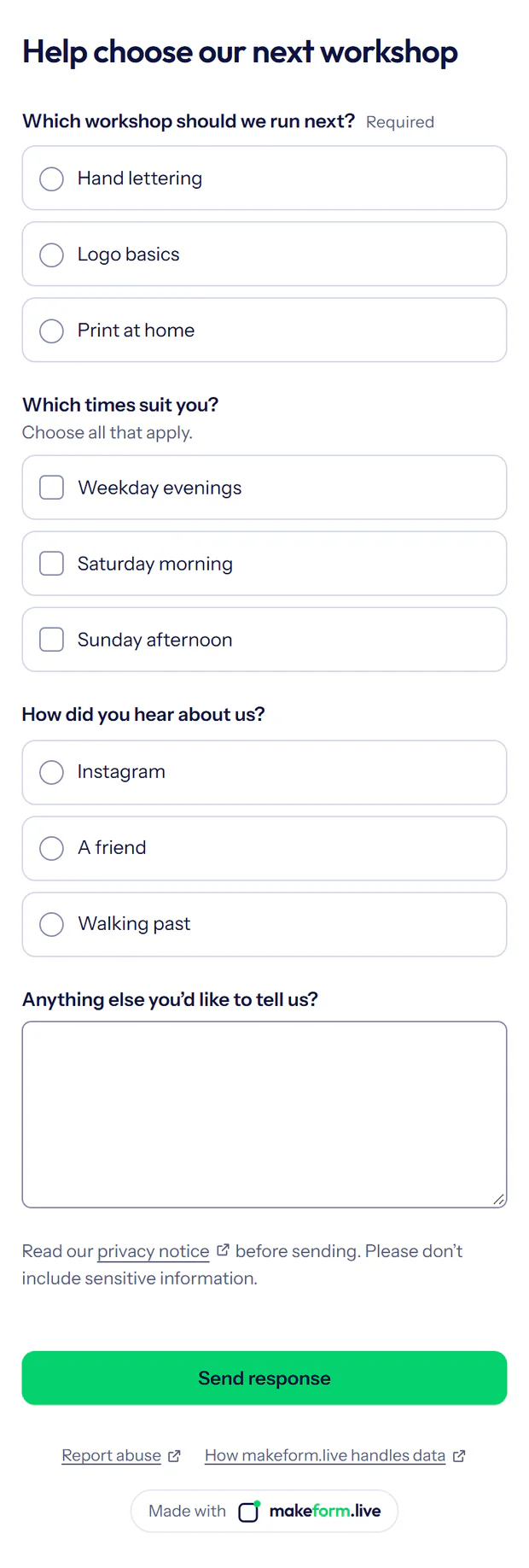
Feedback ends with an optional email for a reply; otherwise there’s no name or email question unless you add one.
To collect answers in person, print the poll’s QR code from Share: a table card, poster, card sheet or sticker, with a headline you can change (“Vote now” for a poll). QR codes and printing.
Changing questions
Once someone answers, the questions can’t change, because a changed question or option would change what earlier answers mean. Duplicate the survey to ask different questions; the copy starts with no responses.
Closing date and time zone
A survey can close on a date and time in the time zone you choose; we show the UTC time too. After that, the link says it’s closed. You can close it yourself any time and reopen it later; reopening asks for a new closing date or none. Closing doesn’t delete responses.

Results
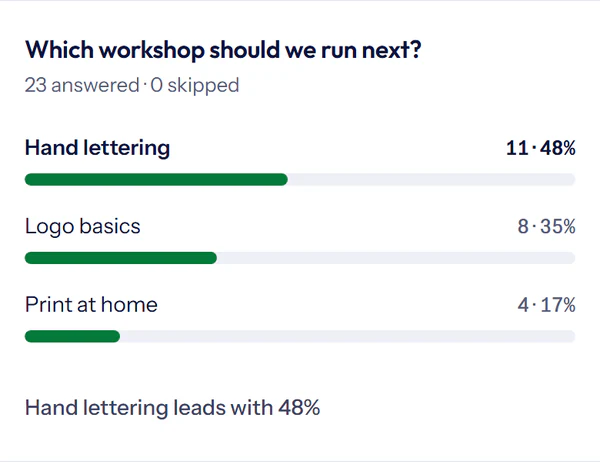
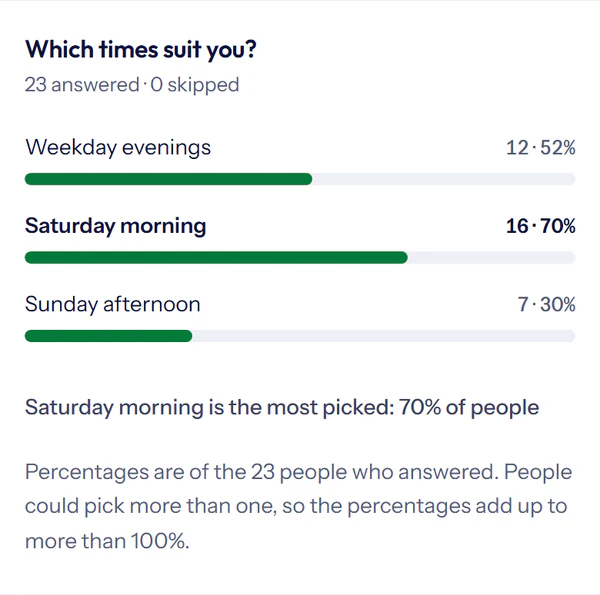
Find your polls and surveys in Forms → Polls and surveys. Each one’s Results shows the totals; Responses lists every response. Each choice shows its count and percentage. Percentages are of the responses that answered that question, and optional questions show how many skipped it.
Written answers appear newest first. Long answers are shortened in Results; the full answer is in Responses and the download.
With one choice question and a short text question, such as name and size, Results also list who chose what.
Poll and survey responses have their own monthly allowance, separate from contact inquiries.
What the totals count
Totals count the responses still stored here. Responses are deleted after your retention period, and spam or deleted responses aren’t counted. A survey isn’t a vote: we don’t check who answers, and the same person can answer more than once.
Share your results
By default, only the account owner and Members see results. You can share combined choice totals after voting or through a public results link. Written answers aren’t shown in shared results.
- Choose Share results to download or share an image of one question’s totals; on Pro it can use your logo and colour instead of the makeform.live credit.
- Choose Save as PDF for an A4 sheet of your results; written answers are left out.

Emails and alerts
- Polls and feedback forms can email you when they close.
- For feedback forms and surveys, turn on response emails in Review and publish or Settings → Notifications.
- An alert includes a survey only when you tick it in that alert’s list of forms.