Skip to content

Choose a plan for your forms and polls.

Start free with contact forms, polls and a private inbox. Choose Pro for your own branding, follow-up tools and higher limits.

Billing period

Free

Start simple

US$0/ month

For your first forms and polls.No paid subscription needed.

  • 1,000 inquiries per month
  • 10,000 poll and survey responses per month
  • Keep inquiries and responses up to 90 days
  • 1 verified email recipient per form
  • 1 chat alert
  • Up to 3 Members

No card needed

makeform.live Pro

Your brand

US$12US$120/ month, tax included/ year, tax included

or US$120 / year, tax included (2 months free)For your brand and follow-up.Everything in Free, plus higher limits and more features.

  • 5,000 inquiries per month
  • 100,000 poll and survey responses per month
  • Keep inquiries and responses up to 365 days
  • 3 verified email recipients per form
  • Up to 3 alerts: chat or a signed webhook
  • Up to 10 Members, more on request
  • Your logo, brand colour and form styles; no promotional badge
  • Automatic receipt to visitors who leave their email
  • A reminder when an inquiry isn’t handled

Monthly starts with a 14-day free trial: add a card, pay nothing for 14 days, cancel any time before it ends. One trial per account.Yearly: full refund of your first payment, tax included, if you ask within 14 days of paying.

Pro prices include tax; checkout shows your total before you pay. Compare every feature.

Make it look like your business.

The same contact page, with your logo and colours.

  • Your logo, brand colour and more layouts, with no promotional badge
  • Your own thank-you screen
  • An automatic receipt to visitors
  • A reminder when an inquiry isn’t handled
  • Photos and PDFs from visitors
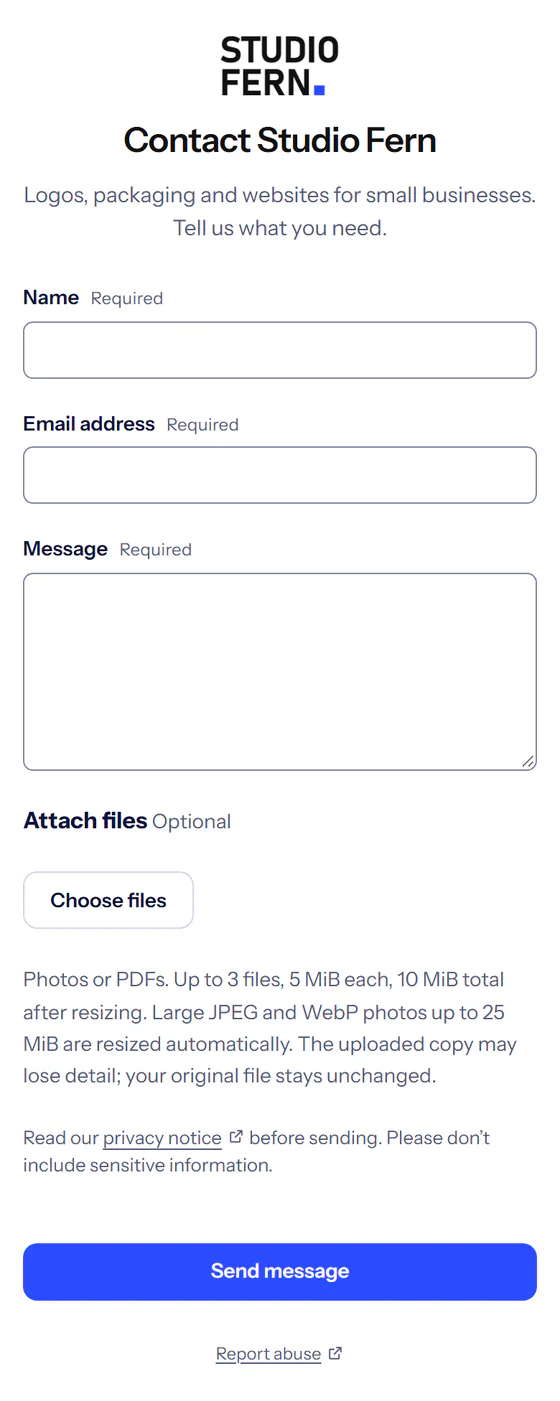
Studio Fern’s contact page on Pro: its wordmark above a centred title in its own font, the questions, an Attach files button for photos or PDFs, and its blue Send message button, with no badge.
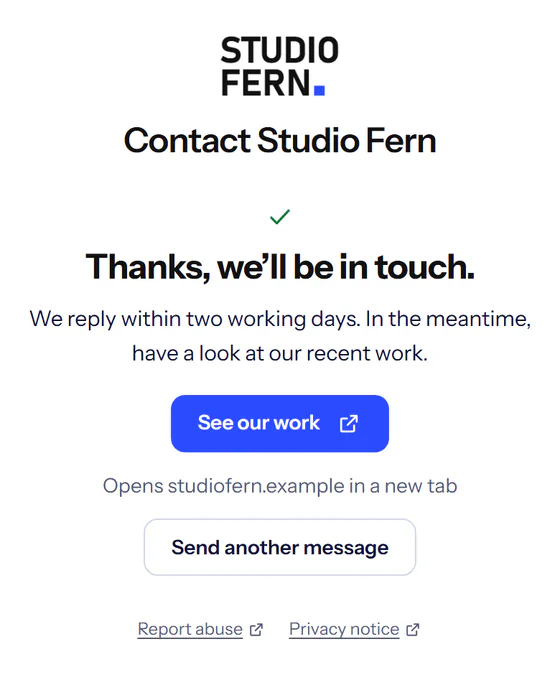
Studio Fern’s own thank-you screen after sending: Thanks, we’ll be in touch, a short message and a See our work button.
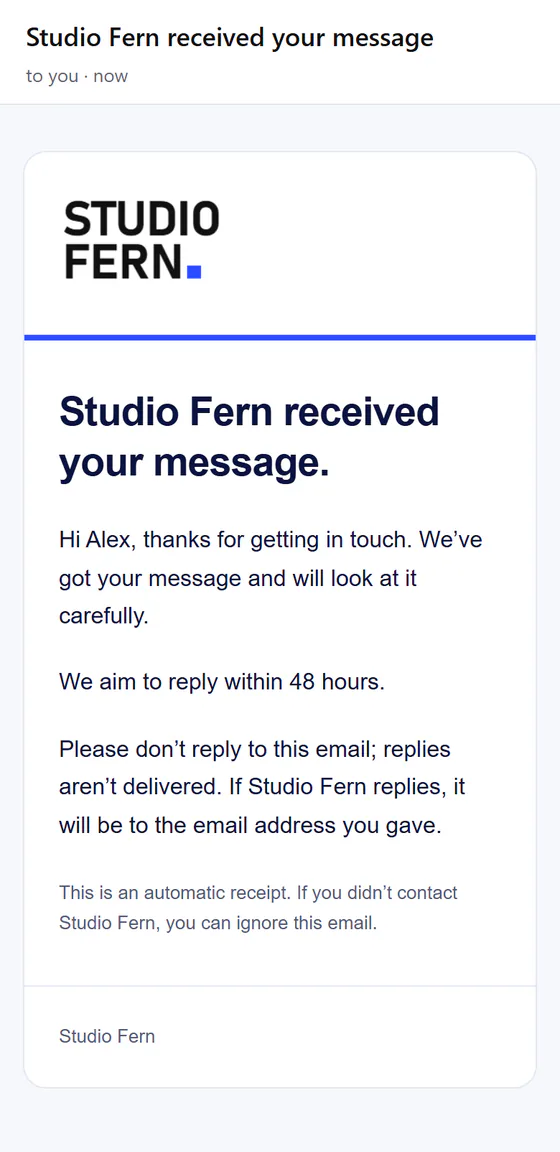
The automatic receipt the visitor receives, in Studio Fern’s brand: its wordmark and blue line, Studio Fern received your message, a short thank-you, We aim to reply within 48 hours, and a note asking them not to reply to the email.

Compare every feature.

Free and Pro side by side
FreeSign up freeProStart 14-day free trialChoose yearly
Allowances
New inquiries per month1,0005,000
New poll and survey responses per month10,000100,000
Keep inquiries and responses forUp to 90 daysUp to 365 days
Verified notification emails per form13
Alerts1 chat alertUp to 3: chat or a signed webhook
Members besides the ownerUp to 3Up to 10, more on request
Forms100100
Projects100100
Stored answers: inquiries and surveys64 MiB256 MiB
Only in Pro
Automatic receipt, with your message, to visitors who leave their emailNot includedIncluded
A reminder after 24, 48 or 72 hours when an inquiry isn’t handledNot includedIncluded
Your logo and brand colour on forms and visitor receipts; no promotional badgeNot includedIncluded
More form styles: layouts, heading and text colours, and font choicesNot includedIncluded
Your logo and colour on printed QR cards and results images, without the makeform.live creditNot includedIncluded
Photos and PDFs from visitors; 1 GiB private storageNot includedIncluded
Labelled links that show which shared link brings inquiriesNot includedIncluded
Insights: inquiry trends, busiest forms and handling timeNot includedIncluded
Your own thank-you screen, with an optional buttonNot includedIncluded
Signed webhooks to your own server or automation toolsNot includedIncluded
In both plans
Contact forms, polls, feedback and surveysIncludedIncluded
Share by link, QR code or your websiteIncludedIncluded
Private inbox, export and deletionIncludedIncluded
Email notifications to verified addressesIncludedIncluded
Combined poll results you can shareIncludedIncluded

Allowances are shared across your account unless stated otherwise. Monthly allowances renew; stored answers share one account limit that does not reset monthly.

  • Prices include tax. The displayed Pro prices include any tax that applies: US$12 a month or US$120 a year, wherever you are. Paddle works out the tax included in that price for your billing location.
  • No automatic overage charges. At your inquiry allowance, new inquiries pause until it resets or you upgrade; the same applies to poll and survey responses at their own allowance.
  • Paddle handles payment. Paddle is the seller and merchant of record for paid subscriptions, handling payments, transaction taxes and invoices.

Read our refund policy and subscription terms.

Good to know.

What counts as an inquiry or a response?

A message successfully saved from any of your contact forms counts once as an inquiry. A poll or survey response counts once as a response, however many questions it answers. Inquiries and responses have separate monthly allowances, so a popular poll never uses up your inquiry allowance. Both use the same stored-answer space. Opening, replying to or deleting an inquiry or response does not change the amount already used. Both allowances renew every month, including on yearly Pro, which is billed once a year. Your account shows the next renewal date.

What happens when I reach the limit?

New messages, or new responses, cannot be accepted until that allowance renews or you upgrade. There are no automatic extra charges. You can still read and export saved inquiries before their scheduled deletion dates.

Is retention the same as my monthly allowance?

No. Your monthly allowances count new inquiries and poll or survey responses. Retention controls how long each saved inquiry or response stays, starting when it arrives. Setup suggests 90 days. Increasing retention applies to new inquiries and responses; it does not extend older ones. Choosing a shorter period also shortens existing expiry dates. Survey totals count retained responses, so they change when responses expire or are deleted. Export anything you need before it expires.

How do I cancel?

Upgrade, cancel or resume, see your invoices and update your card in Plan & billing.

Pro renews monthly or yearly, depending on your plan, until cancelled. Cancelling keeps Pro until the end of the paid month or year. Cancelling during the free trial means you aren’t charged; Pro stays until the trial ends. Our additional 14-day first-payment guarantee for yearly Pro includes charged tax; a guarantee refund ends Pro immediately.

How the first-payment refund works

Do I need a VAT number?

Checkout shows the full recurring price before you order. Individuals and businesses can subscribe; a VAT number is not required. If you buy for a business and give a valid VAT number where tax isn’t charged on the sale, Paddle removes the tax, so you pay less.

Who handles payment and invoices?

Paddle is the seller and merchant of record for paid subscriptions, handling payments, transaction taxes and invoices. Vlomkat Solutions FZ-LLC provides makeform.live and product support.

You pay on makeform.live, and your card details go into Paddle’s secure checkout.

Pro features in detail

Insights shows inquiry trends, your busiest forms and labelled links, and how quickly inquiries are marked handled. Choose the last 7, 30 or 90 days or a year. Daily totals contain no submitted fields and last 12 months; older history may be incomplete. Handling time does not measure email replies.

Receive photos and PDFs with inquiries. Enable file uploads per form: up to three files, 5 MiB each and 10 MiB per inquiry, with 1 GiB of private storage across your account. Visitors can send PNG, JPEG or WebP photos, or PDFs (iPhone HEIC photos aren’t accepted); photos are saved as WebP without location details. Download files from your inbox; they follow the inquiry’s retention and deletion.

Show your business name, logo and colour on shareable forms and embeds, including the link preview. Remove the promotional makeform.live badge; privacy links remain.

Choose more form styles: the Centred, Minimal and Soft layouts, heading and text colours, and font choices. Free uses the Classic layout. When you use your branding, your logo and colour also appear on printed QR cards and posters and on shared results images. Pro prints and results images never show the makeform.live credit.

Send visitors an automatic receipt with your own message and an optional expected reply time. When you use your branding, these emails show your name, logo and colour without makeform.live promotion. It contains no submitted inquiry content and comes from a do-not-reply address, so your email address is never shown. To prevent unwanted email, receipts are limited to one per visitor address per hour across makeform.live and 500 per account per UTC calendar day.

Choose one reminder after 24, 48 or 72 hours if an inquiry is still not handled. Mark it handled to cancel its reminder. Both email options are off until you enable them and apply to future inquiries.

Send a signed webhook to your own HTTPS address or automation tool for each new inquiry. It carries identifiers, the form and project names, the time and a private link, not the visitor’s answers; to read answers, give the app access as a connected app. A webhook counts towards your 3 alerts. If you move to Free, webhooks pause and resume when you upgrade.
How large can answers be?

Each form supports 50 questions. Short text allows 200 characters, long text 2,000, and email addresses 254. All 50 maximum-length text answers fit within the 3 MiB answer envelope. Storage counts the UTF-8 bytes of saved answer JSON, including its field names and JSON formatting. It excludes files, indexes and backups. Restricted and not-yet-deleted answers still count.

Stored answers from inquiries and surveys share one account allowance, separate from files. It does not reset monthly. New answers stop when storage is full; existing inquiries remain readable and exportable until their usual deletion date. Storage is freed when records are actually deleted, including after retention cleanup. No automatic storage charges apply.

Questions before you start?

Tell us what you need.

Share where you want to use it and what you want to receive. We can help you choose a form, a poll or a website option.

Write a message
What would you like to set up?

For example: what people should send or answer, and where you’ll share it.

Spam protection

Loading spam protection…

We use these details only to reply to you. Privacy notice

We reply by email.

Prefer email? contact@vlomkatsolutions.com